
Last Updated: May 2026 | Verified Working Repositories
CloudStream repository URLs and extensions are what make the app work. Without a working repository added, CloudStream shows no content, no movies, no TV shows, no anime. This page gives you the complete updated list of every working CloudStream repository URL and shortcode for 2026.
Whether you need the Phisher repo URL, the MegaRepo shortcode, the CNCVerse (cncv) link for Indian content, or the CSX/Megix repo for Hindi and English movies, everything is on this page. We also cover how to add a repository to CloudStream step by step, how to install extensions, and how to fix extensions that stop loading.
In this guide, we have shared the best CloudStream extensions & repository list that are trusted by the community and regularly updated.
You will find working repository URLs, short codes, and top extensions category-wise such as Movies, Anime, TV Shows, All-in-One, and Live TV.
We have also included step-by-step instructions, tips to keep extensions working, and answers to common questions.
Before adding repositories, make sure you have the latest version installed. Download CloudStream APK here.
What Is a CloudStream Repository?
A CloudStream repository is an online storage hub that holds multiple extensions or plugins in one place. Think of it like an app store inside the app itself. You add the repository URL or shortcode once, and every extension inside it becomes available to install.
Without at least one repository added, CloudStream is completely empty. It does not host any content itself. The extensions inside each repository are what connect the app to streaming sources for movies, TV shows, anime, and live TV.
Each repository is hosted on GitHub as a repo.json or cs.json file. You can add as many repositories as you want. CloudStream merges all extensions from every repo you add.
Full CloudStream Repository List – URLs & Shortcodes (2026)
All repository URLs below are verified working as of May 2026. Use either the full URL or the shortcode when adding to CloudStream. If a URL fails to load, turn on a VPN first your ISP may be blocking GitHub raw URLs.
| Repository Name | Repository URL | Short Code | Description |
|---|---|---|---|
| CloudStream Providers Repo | https://raw.githubusercontent.com/recloudstream/extensions/master/repo.json | cspr | Official main repo with core providers (Dailymotion, YouTube, Twitch). |
| Mega Repository | https://raw.githubusercontent.com/self-similarity/MegaRepo/builds/repo.json | megarepo | “All-in-one” repo containing many sub-repos (install all extensions together). |
| Phisher Repo | https://raw.githubusercontent.com/phisher98/cloudstream-extensions-phisher/refs/heads/builds/repo.json | phisherrepo | Large collection (anime, Bollywood, regional cinema, sports, IPTV, etc.). |
| doGior’s Had Enough | https://raw.githubusercontent.com/doGior/doGiorsHadEnough/refs/heads/builds/repo.json | gior | Mixed content (anime, international TV/movies, live shows). |
| CakesTwix Provider | https://raw.githubusercontent.com/CakesTwix/cloudstream-extensions-uk/master/repo.json | cakes | Eastern European/Ukrainian content (anime, cartoons, local shows). |
| Saimuel Repo | https://raw.githubusercontent.com/saimuelbr/saimuelrepo/refs/heads/main/builds/repo.json | saim | Brazilian/Portuguese media (films and series like FilmesOn, Doramas, etc.). |
| CNCVerse Repository | https://raw.githubusercontent.com/NivinCNC/CNCVerse-Cloud-Stream-Extension/refs/heads/builds/CNC.json | cncv | Indian content hub (Netflix/Hotstar/Prime mirrors, Tamil/Kollywood, live TV channels). |
| Megix Repo (CSX) | https://raw.githubusercontent.com/SaurabhKaperwan/CSX/builds/CS.json | csx | Hindi & English (Bollywood and global movies) repo. |
| King | https://pastebin.com/raw/Cd2g2tfz | kingl | IPTV plugin (XtreamIPTV extension for live TV streams). |
These repositories are community-verified and regularly updated. Always double-check URLs (use the full URL or shortcode) when adding them to CloudStream.
MegaRepo – Install All CloudStream Extensions at Once
MegaRepo (shortcode: megarepo) is the easiest starting point for new CloudStream users. It contains a single plugin called “Mega” which, when run once, automatically adds all other known repositories to your app. You do not need to manually add each repo URL individually. After running it once, you can uninstall the Mega plugin itself and keep all the repos it added.
URL: https://raw.githubusercontent.com/self-similarity/MegaRepo/builds/repo.json
Phisher Repo – Best for Anime, Bollywood & Sports
Phisher repo (shortcode: phisherrepo) is one of the largest community repositories available. It includes extensions for anime (AnimePahe), Bollywood and regional Indian cinema, international movies (YTS), sports streams, and IPTV. Notable extensions in Phisher repo: Ultima, AnimePahe, YTS, StremioAddon, XDMovies.
CNCVerse Repo (cncv) – Best for Indian Content
CNCVerse (shortcode: cncv) is the go-to repository for Indian users. It mirrors content from Netflix, Hotstar, and Amazon Prime India, and includes Tamil, Kollywood, and live Indian TV channels. Notable extensions: CastleTV, HDO, Watch32.
Megix Repo / CSX – Best for Hindi & English Movies
Megix repo, also called CSX (shortcode: csx), specializes in Hindi and English movies. It covers Bollywood and global Hollywood titles with solid streaming quality. The most popular extension from this repo is CineStream.
URL: https://raw.githubusercontent.com/SaurabhKaperwan/CSX/builds/CS.json
CloudStream Extensions List by Category (2026)
Below are some popular extensions organized by content type. Each entry shows the extension name, its repository, what it does, and whether it’s currently active.
Extensions for Movies
| Extension Name | Repository | Description | Status |
|---|---|---|---|
| CastleTV | CNCVerse (cncv) | Movies & sports streaming site | Active |
| HDO | CNCVerse (cncv) | High-definition movie streams (HDO) | Active |
| CineStream | CSX (csx) | Bollywood and Hollywood films | Active |
| Watch32 | CNCVerse (cncv) | Classic and latest movies archive | Active |
| YTS | Phisher (phisher) | Torrent-based movies (YTS) | Active |
CloudStream Extensions for Anime
| Extension Name | Repository | Description | Status |
|---|---|---|---|
| AnimeON | CakesTwix (cakes) | Ukrainian anime library | Active |
| AnimeUA | CakesTwix (cakes) | Anime (VOD) service | Active |
| AnimeWorld | doGior’s (gior) | Multi-source anime catalog | Active |
| AniZone | CuxPlug (CuxPlug) | Streaming anime (AniZone.to) | Active |
| AnimePahe | Phisher (phisher) | Asian anime episodes collection | Active |
CloudStream Extensions for TV/Web Series
| Extension Name | Repository | Description | Status |
|---|---|---|---|
| NetflixMirror | CSX (csx) | Indian mirrors of Netflix shows | Active |
| MegaFlix | Saimuel (saim) | International TV series | Active |
| GoFlix | Saimuel (saim) | TV shows (Portuguese/International) | Active |
| OnlineSerieTV | doGior’s (gior) | Italian/European TV series provider | Active |
| OnePace | Avocado/Rowdy (rowdycado) | Anime story arcs (Speedruns) | Active |
CloudStream Extensions for Live TV & IPTV
| Extension Name | Repository | Description | Status |
|---|---|---|---|
| XtreamIPTV | King (kingl) | IPTV live channels via Xtream codes | Active |
| LiveTV | CNCVerse (cncv) | Indian live TV channels | Active |
| Sports Streams | Phisher (phisher) | Live sports and events | Active |
CloudStream Extensions by Language
| Language | Best Repository | Example Extensions |
|---|---|---|
| Hindi / Indian | CNCVerse (cncv), CSX (csx) | CineStream, NetflixMirror, HDO |
| Portuguese / Brazilian | Saimuel (saim) | MegaFlix, GoFlix, FilmesOn |
| Ukrainian / Eastern European | CakesTwix (cakes) | AnimeON, AnimeUA |
| Italian / European | doGior’s (gior) | OnlineSerieTV, AnimeWorld |
| English (Global) | Phisher (phisher), MegaRepo | Ultima, YTS, StremioAddon |
| Anime (Multi-language) | Phisher, CakesTwix, doGior’s | AnimePahe, AnimeWorld, AniZone |
CloudStream All-in-One Extensions
These extensions pull from multiple sources (movies, shows, sports)
| Extension Name | Repository | Description | Status |
|---|---|---|---|
| Ultima | Phisher | Multi-content aggregator (movies, anime, TV) | Active |
| StremioAddon | Phisher | Generic all-in-one streams (misc. content) | Active |
| XDMovies | Phisher | Mixed content (movies & series) | Active |
How to Add a Repository to CloudStream
Follow these steps on your Android, FireStick, or PC (via emulator).
- Launch CloudStream and tap Settings.
- Go to Extensions and select Add Repository.
- Enter a Name (optional) and the Repository URL (or shortcode) from above, then tap Next.
- After adding, CloudStream shows the repo and its extensions. Go back and tap Open Repository.
- Browse or search for the extension you want, and tap Download to install it.
- Return to Home and tap the extension drop-down at the bottom to select your new extension.
Instead of typing the full URL, you can type just the shortcode (for example, type phisherrepo or cncv or megarepo in the URL field). This works the same as entering the full URL and is much faster on a remote or TV keyboard.
These steps work similarly on FireStick (use the remote with on-screen keyboard) and on PC with an Android emulator.

Step-1: Select App Language
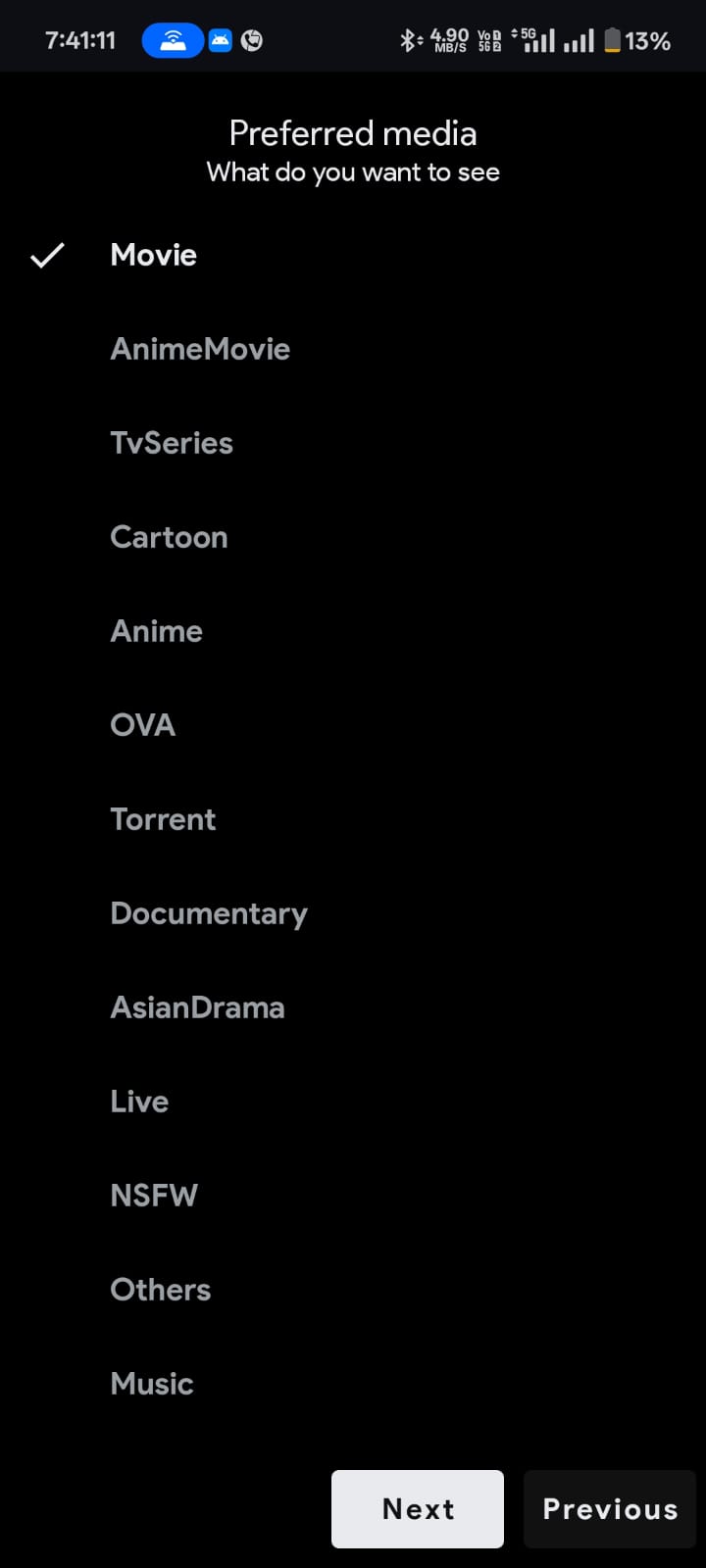
Step-2: Select Prefered Media Type
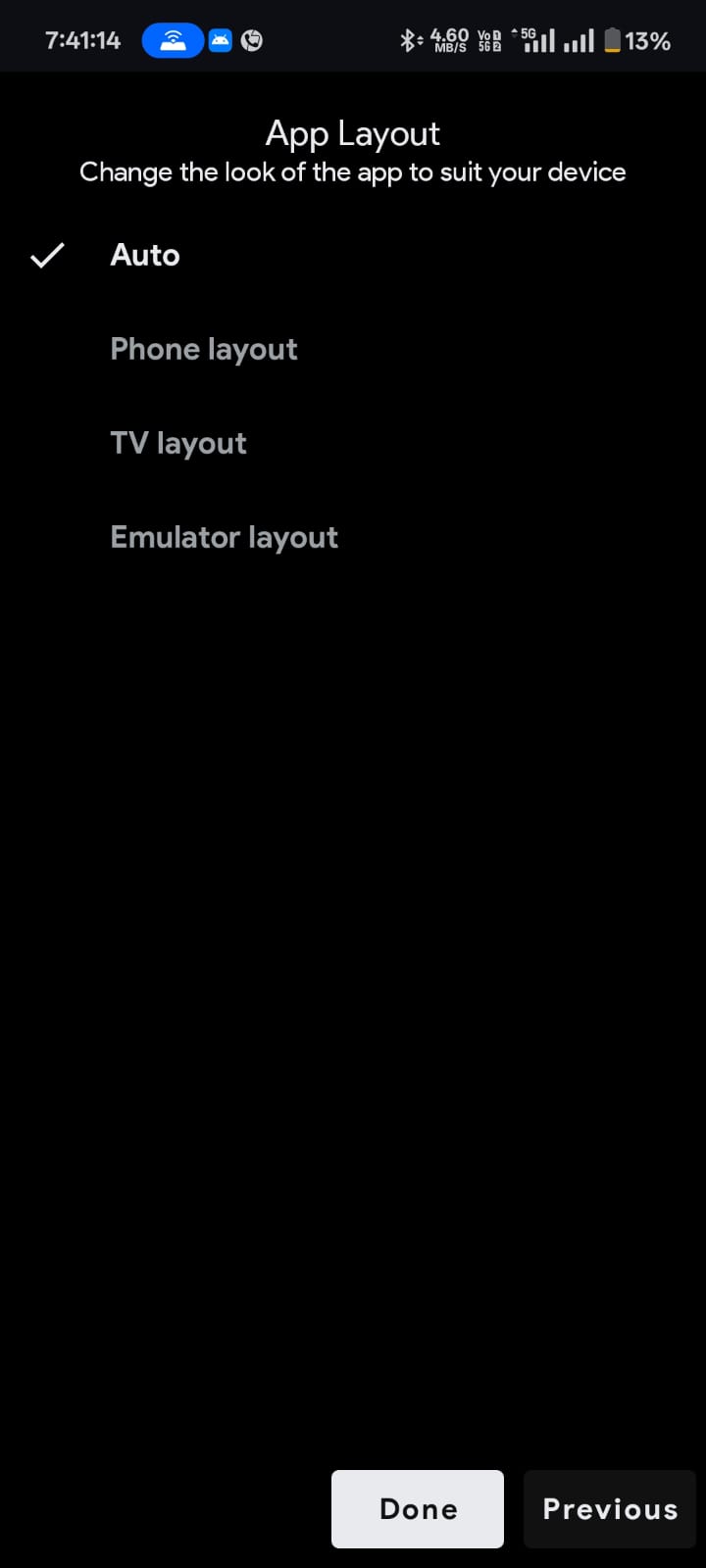
Step-3: Select App Layout
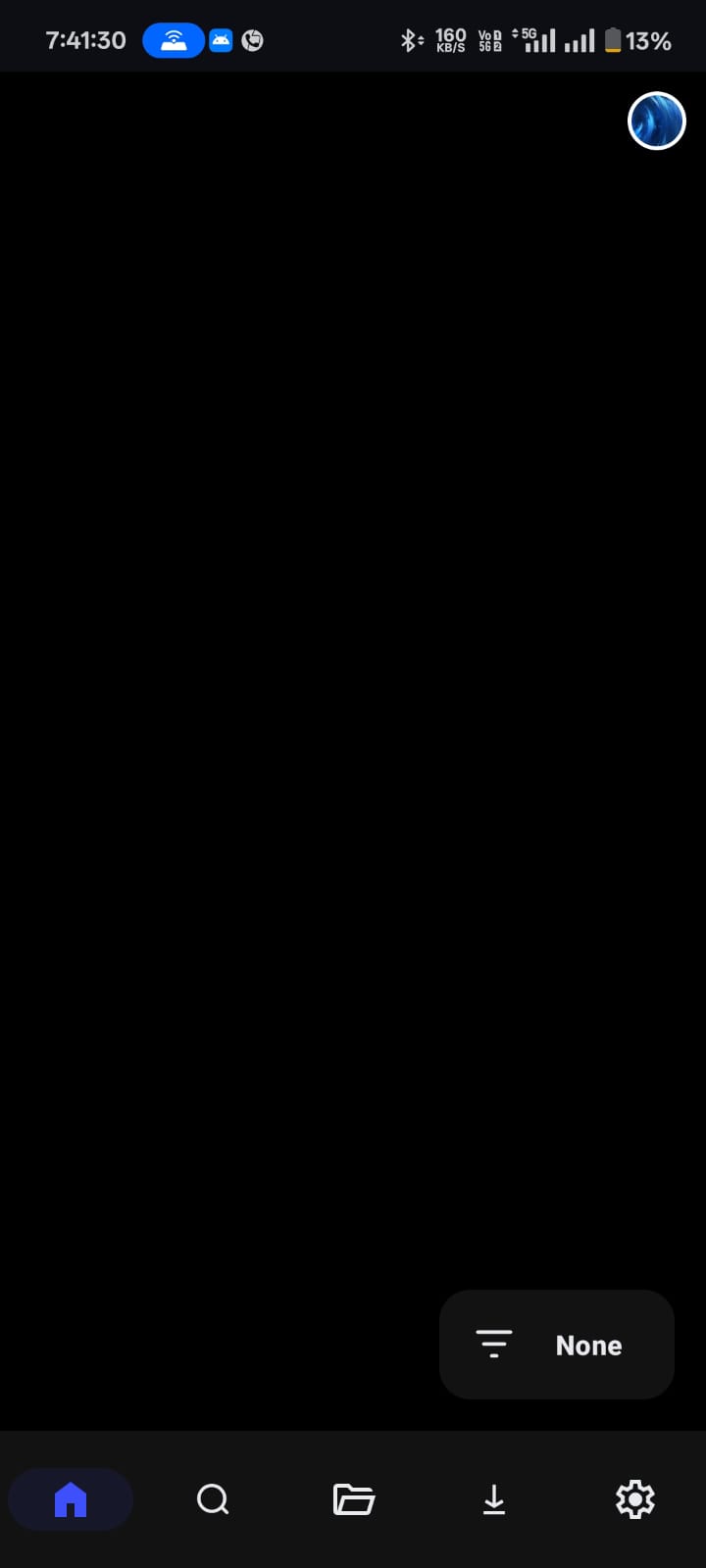
Step-4: Click Setting Icon

Step-5: Click Extension Option

Step-6: Click Add Repository

Step-7: Add Name and URL or Short COde

Step-8: Click Open Repository

Step-9: Download Extension

Step-10: Choose Extension

Step-11: Final Show Your Stream
Step-1: Select App Language
Step-2: Select Prefered Media Type
Step-3: Select App Layout
Step-4: Click Setting Icon
Step-5: Click Extension Option
Step-6: Click Add Repository
Step-7: Add Name and URL or Short COde
Step-8: Click Open Repository
Step-9: Download Extension
Step-10: Choose Extension
Step-11: Final Show Your Stream
How to Use CloudStream on Android TV, FireStick & Smart TV
CloudStream works on Android TV, FireStick, and Google TV using the same APK. Sideload the APK using a downloader app (such as Downloader by AFTVnews). Once installed, use your remote to navigate the interface is remote-friendly.
Adding repositories on TV works the same way: go to Settings > Extensions > Add Repository and enter the URL or shortcode using the on-screen keyboard.
For faster input on TV, use a shortcode (for example, cncv or phisherrepo) instead of the full URL. Repositories added on your phone do not sync to your TV you need to add them separately on each device.
Why Are My CloudStream Extensions Not Working? (2026 Fix)
If your extensions are not loading or showing no content, here are the most common causes and fixes:
- Your ISP is blocking GitHub raw URLs. This is the most common cause. Fix: turn on a VPN before adding or opening any repository URL.
- Your CloudStream app version is outdated. Some repos require the latest pre-release build. Fix: download the latest version from the official CloudStream GitHub.
- The repository is temporarily offline. Fix: check the CloudStream Discord or Reddit community — if the repo maintainer’s GitHub is down, it will be reported there.
- You typed the wrong URL or shortcode. Fix: copy the exact URL from the table above rather than typing it manually.
- Extensions need a manual re-download after a CloudStream app update. Fix: go to Settings > Extensions and re-download any extension showing an update icon.
- CloudStream cache is corrupted. Fix: go to your device’s App Settings > CloudStream > Clear Cache, then relaunch.
See our full guide on CloudStream repository URL not found errors.
Tips for Using CloudStream Repositories Smoothly
Many CloudStream users route through a VPN. It can bypass geo-restrictions and keep you private.
If an extension is misbehaving, clear CloudStream cache or app data and relaunch.
Extensions and the app update often. Always use the latest versions (get updates from the official CloudStream sources).
Only add well-known repository URLs. Unknown repos may be inactive or unsafe.
A slow or restricted network can cause “no links” errors. Switching Wi-Fi or using mobile data sometimes fixes loading issues.
FAQs
What is a CloudStream extension?
It’s a plugin that adds a content source to CloudStream. Installing an extension gives you access to the content it provides.
Are GitHub repositories safe?
Official and well known repos are generally safe. They only host extension code, not copyrighted media. However, avoid random or shady URLs. Stick to community recommended repos to stay secure.
Why is an extension not loading?
Possible reasons: the extension is outdated or the repo is offline, or your internet is blocking it. Try clearing CloudStream cache, update to the latest app and extension versions, or use a VPN. These steps often fix loading errors.
Can I install multiple repos?
Yes. You can add many repository URLs/shortcodes. CloudStream will merge extensions from all added repos.
Do I need to update extensions?
Yes. Like apps, extensions may be updated by their maintainers. When a new version appears, reinstall or update it through CloudStream to keep getting working links.
How do I check if a repo is down?
If you can’t find expected extensions, the repo might be offline. You can test by opening the repo URL in a browser or checking CloudStream community forums/Discord. Often, the community will report when a repo is temporarily down.
Can I use CloudStream on Fire TV or PC?
Absolutely. On FireStick/Fire TV, install the APK and use the remote. On PC, use an Android emulator like BlueStacks. The process for adding repos and extensions is the same as on mobile.
Does CloudStream automatically update repositories and extensions?
Yes. By default, CloudStream automatically checks for and installs updates to all repositories and extensions when you open the app. You do not need to manually update them. If you want to update manually, go to Settings > Extensions and pull down to refresh.
What is the shortcode for Phisher repo?
The shortcode for Phisher repo is phisherrepo. Type this in the Add Repository field instead of the full URL. For MegaRepo use megarepo, for CNCVerse use cncv, and for CSX/Megix repo use csx.
Is CloudStream free?
Yes, CloudStream is completely free and open source. There are no subscriptions, no sign-ups, and no ads inside the app itself. All repositories and extensions are also free.
Conclusion
In summary, using good repositories and updated extensions is key to smooth streaming on CloudStream. Stick to the trusted repo list above, regularly install updates, and clear cache when needed.
With the right setup, you can enjoy a vast library of movies, shows, anime, and live content on your Android, FireStick, PC, or smart TV. Happy streaming.